Introduction
Desktop computers remain a cornerstone of productivity and entertainment for many households and businesses. Whether you're a student tackling assignments, a professional managing complex workloads, or a creative individual pushing the boundaries of digital art, the right desktop can significantly enhance your experience. Choosing carefully matters because a well-suited machine not only performs better but also offers greater longevity and satisfaction. This guide will walk you through the essential factors to consider, helping you make an informed decision based on real-world examples.
Key Factors to Consider
When evaluating desktop computers, several key specifications and features directly impact performance and usability. Understanding these will help you match a machine to your specific requirements.
Processor (CPU)
The processor is the brain of your computer. For everyday tasks like web browsing, email, and office applications, processors like the Intel Celeron N5095 found in the KAMRUI AK1PLUS (Product 4) offer adequate performance. For more demanding multitasking or light creative work, processors such as the Intel Core i3-10110U (used in GMKtec G3 Pro, Products 3 and 5) or the AMD Ryzen 7330U in the KAMRUI Pinova P2 (Product 1) provide a noticeable boost. The 12th generation Intel i5-12600H in the KAMRUI P2 (Product 8) represents a significant leap, offering performance that can rival higher-end CPUs, making it suitable for more intensive applications.
Memory (RAM)
RAM determines how many applications your computer can handle simultaneously without slowing down. Most modern desktops come with at least 8GB of RAM, like the GMKtec G3S (Product 2). However, for smoother multitasking, especially with multiple browser tabs, office suites, or background applications, 16GB of RAM is highly recommended. You'll find this in the KAMRUI Pinova P2 (Product 1), KAMRUI AK1PLUS (Product 4), GMKtec G3 PRO (Product 5), and KAMRUI P2 (Product 8). More RAM generally leads to a more fluid user experience.
Storage (SSD)
The type and size of storage significantly affect boot times and application loading speeds. Solid State Drives (SSDs) are far superior to traditional Hard Disk Drives (HDDs) for speed. All the mini PCs listed here feature SSDs, typically ranging from 256GB to 512GB. For instance, the GMKtec G3S (Product 2) and GMKtec G3 Pro (Product 3) come with 256GB SSDs, while the GMKtec G3 PRO (Product 5) offers a more generous 512GB. The KAMRUI Pinova P2 (Product 1) and KAMRUI AK1PLUS (Product 4) also offer 256GB SSDs but highlight expansion options. For users with large media libraries or extensive software collections, considering models with larger SSDs or easy expansion capabilities, like the KAMRUI P2 (Product 8) with its 512GB SSD and upgrade potential, is wise.
Graphics Capabilities
For standard office work, web browsing, and video playback, integrated graphics are usually sufficient. The Intel UHD Graphics found in some models can handle basic 4K video. However, for more graphics-intensive tasks, such as photo editing or casual gaming, the integrated AMD Radeon Graphics in the KAMRUI Pinova P2 (Product 1) offers superior performance compared to Intel's integrated solutions. This model specifically mentions driving triple 4K@60Hz displays, indicating robust graphical output capabilities.
Connectivity and Ports
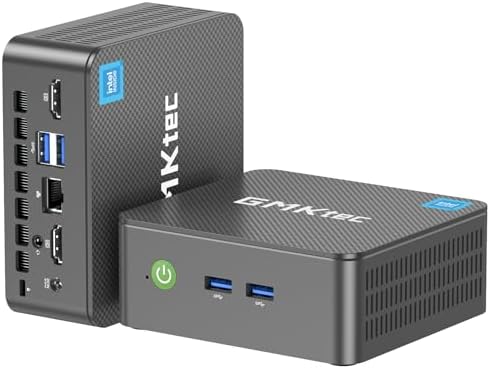
Ensure the desktop has the ports you need. Common connections include USB-A (for peripherals like keyboards, mice, and external drives), HDMI (for displays), and Ethernet (for wired internet). Many modern mini PCs, like the GMKtec models (Products 2, 3, 5) and KAMRUI models (Products 1, 4, 8), offer USB 3.2 ports for faster data transfer, multiple HDMI outputs for dual-monitor setups, and Gigabit or even 2.5GbE Ethernet for faster network speeds. Features like Wi-Fi 6 and Bluetooth 5.2 provide modern wireless connectivity.
Display Output
The ability to support multiple high-resolution displays can significantly boost productivity. Several models excel here: the KAMRUI Pinova P2 (Product 1) supports triple 4K@60Hz displays via HDMI, DP, and USB-C. The GMKtec G3S (Product 2) and GMKtec G3 Pro (Products 3 and 5) offer dual 4K@60Hz HDMI outputs. The KAMRUI AK1PLUS (Product 4) also supports dual 4K@60Hz displays via HDMI. This capability is crucial for multitasking and immersive viewing experiences.
Price and Value
Desktop computer prices vary widely, but the models provided offer a good snapshot of current market value, particularly in the mini PC segment.
- Under $250: Models like the GMKtec G3S (Product 2) at $239.97 offer a solid entry-level experience with an Intel N95 processor, 8GB RAM, and 256GB SSD. These are suitable for basic computing needs.
- $250 - $350: This range includes many capable options. The KAMRUI AK1PLUS (Product 4) is $279.99 with 16GB RAM and a Celeron N5095. The KAMRUI Pinova P2 (Product 1) at $339.99 steps up with an AMD Ryzen 7330U and 16GB RAM. The GMKtec G3 Pro (Product 3) with an Intel Core i3-10110U, 8GB RAM, and 256GB SSD is priced at $246.99, representing a good balance.
- $350 and above: Higher price points often indicate more powerful processors or larger storage. The GMKtec G3 PRO (Product 5) with 16GB RAM and a 512GB SSD is $329.99. The renewed Dell Optiplex 3060 (Product 7) is $362.99 with an Intel i5-8500 and 32GB RAM, offering substantial memory for its price. The KAMRUI P2 (Product 8), featuring a powerful 12th Gen i5-12600H, 16GB RAM, and 512GB SSD, is priced at $409, offering high-end performance in a compact form factor.
Value is determined not just by price, but by the specifications and features offered. A system with more RAM, a faster processor, or greater storage expansion potential might be a better long-term investment, even at a slightly higher initial cost.
Common Mistakes to Avoid
Shoppers can fall into several traps when purchasing a desktop computer. Being aware of these can save you from buyer's remorse.
- Ignoring RAM: Opting for the minimum RAM (e.g., 8GB) might seem cost-effective, but it can lead to sluggish performance as soon as you start multitasking. Aiming for 16GB, if your budget allows, provides a much smoother experience for years to come.
- Overpaying for Unnecessary Features: While advanced features like ultra-fast networking or multiple 4K display outputs are great, ensure you actually need them. For basic tasks, a simpler setup might be more cost-effective.
- Underestimating Storage Needs: A small 256GB SSD fills up quickly with modern software and media files. If you plan to store a lot of data, look for models with larger SSDs or clear expansion options, like the KAMRUI AK1PLUS (Product 4) which supports up to 4TB total storage.
- Confusing Processor Generations: A newer generation processor, even if labeled similarly (e.g., i3 vs. i5), can offer significantly better performance. The 12th Gen Intel processors in some models (Products 2, 8) generally outperform older generations.
How to Judge Quality
Assessing the quality and reliability of a desktop computer can be done by examining its user ratings and review counts. These provide aggregate feedback from a large number of purchasers.
When looking at ratings, a score of 4.3/5 or higher, as seen with all the listed mini PCs (ranging from 4.3 to 4.4), generally indicates a high level of customer satisfaction. However, the review count is equally important. A high rating with a low review count might not be as reliable as a similar rating backed by thousands of reviews. For example, the KAMRUI Pinova P2 (Product 1) has a 4.4/5 rating from 1,918 reviews, suggesting a well-received product. Similarly, the GMKtec G3S (Product 2) boasts a 4.3/5 rating from 1,752 reviews. A higher review count provides a more statistically significant picture of the product's performance and reliability in the hands of many users.
While we cannot access individual reviews, the combination of a strong average rating and a substantial number of reviews is a reliable indicator of a quality product.
Real Options at a Glance
- KAMRUI Pinova P2 (Product 1): Best for multi-display users needing robust graphics.
- GMKtec G3S (Product 2): A great value option for basic computing and office tasks.
- GMKtec G3 Pro (Product 3): Solid performance for everyday productivity with fast networking.
- KAMRUI AK1PLUS (Product 4): Good for users needing ample storage expansion and dual 4K displays.
- GMKtec G3 PRO (Product 5): Excellent choice for those needing more storage (512GB) and strong connectivity.
- Microsoft Windows 11 (Product 6): Essential for running modern software, but not a standalone computer.
- Dell Optiplex 3060 (Renewed) (Product 7): A reliable refurbished option with substantial RAM for multitasking.
- KAMRUI P2 (Product 8): Top-tier performance for demanding users in a mini PC form factor.