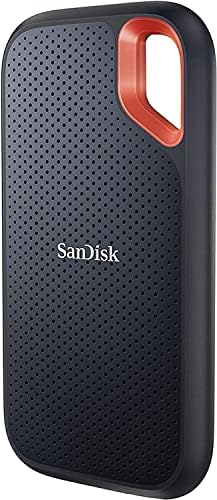
In today's digital age, the amount of data we generate and need to store is constantly growing. From precious family photos and videos to critical work documents and large media files, having a reliable and efficient way to store and transport your data is more important than ever. External storage solutions have evolved dramatically, moving beyond bulky hard drives to sleek, fast, and incredibly durable solid-state drives (SSDs). However, with a plethora of options on the market, choosing the right external drive can feel overwhelming. This guide is designed to demystify the process, equipping you with the knowledge to make an informed decision that perfectly suits your needs and budget. We'll explore the critical factors to consider, common mistakes to avoid, and highlight a particularly compelling option: the Sandisk 1TB Extreme Portable SSD.
1. Why Data Storage Deserves Your Careful Consideration
Think of your data as your digital life. Whether it's your creative portfolio, your business's essential files, or your personal memories, losing it or having it compromised can be devastating. External storage isn't just about having more space; it's about accessibility, security, and speed. An external drive can serve as a crucial backup, a way to offload files from your primary device to keep it running smoothly, or a portable library for large projects. The technology behind these devices, particularly the shift from traditional Hard Disk Drives (HDDs) to Solid State Drives (SSDs), has revolutionized performance. SSDs offer significantly faster read and write speeds, greater durability, and are more compact, making them ideal for users on the move. Understanding these advancements and how they apply to your specific usage patterns is the first step toward a wise purchase.
2. Key Factors to Evaluate When Choosing an External Drive
When you're investing in external storage, several key specifications and features should guide your decision. Focusing on these will ensure you get a drive that meets your performance, durability, and security requirements.
a) Capacity: How Much Space Do You Really Need?
This is often the first consideration. How much data do you anticipate storing? For basic backups of documents and photos, 500GB might suffice. However, if you work with large video files, high-resolution images, or extensive game libraries, you'll need significantly more. The Sandisk 1TB Extreme Portable SSD, for example, offers a substantial 1TB of storage, which is a sweet spot for many users needing ample space for a variety of files without being excessively large or expensive. Consider your current storage needs and project future growth. It's generally more cost-effective to buy a larger capacity drive upfront than to purchase multiple smaller ones later.
b) Performance: Speed Matters
This is where SSDs truly shine. Look for specifications related to read and write speeds. The Sandisk 1TB Extreme Portable SSD boasts NVMe solid-state performance with up to 1050MB/s read and 1000MB/s write speeds. This is crucial for tasks like transferring large files quickly, editing videos directly from the drive, or booting up operating systems. These speeds are facilitated by the drive's interface – USB 3.2 Gen 2, which is a modern standard designed for high-speed data transfer. Older drives or those using slower interfaces will significantly bottleneck your workflow.
c) Durability and Ruggedness: Protecting Your Data
If you plan to travel with your drive or use it in less-than-ideal conditions, durability is paramount. The Sandisk 1TB Extreme Portable SSD is designed for ruggedness, offering up to 3-meter drop protection and IP65 water and dust resistance. This means it can withstand significant impacts and exposure to the elements, providing peace of mind. An IP65 rating, for instance, indicates protection against dust ingress and water jets. For professionals working in the field or anyone prone to accidental drops, these features are invaluable.
d) Connectivity: Ensuring Compatibility
Most modern external SSDs utilize USB-C, a versatile and reversible connector. However, it's essential to ensure your computer or device also has a compatible port. The Sandisk drive uses USB-C and supports USB 3.2 Gen 2, ensuring high speeds. Check that your system supports USB 3.2 Gen 2 or at least USB 3.0/3.1 for optimal performance. If your computer only has older USB-A ports, you might need an adapter or a cable that accommodates both.
e) Security Features: Keeping Your Data Safe
For sensitive personal or professional data, security is non-negotiable. Many external SSDs offer password protection and hardware encryption. The Sandisk 1TB Extreme Portable SSD includes password protection with 256‐bit AES hardware encryption. This means your data is encrypted directly on the drive itself, offering a robust layer of security that is independent of your computer's operating system. This feature is particularly important if you handle confidential information or simply want an extra layer of privacy.
f) Portability and Design: Convenience on the Go
The physical design of an external drive can impact its usability. Factors like weight and dimensions matter, especially for portable drives. The Sandisk 1TB Extreme Portable SSD is lightweight at just 0.11 pounds and compact, measuring approximately 3.96 x 2.06 x 0.35 inches. Its design also includes a handy carabiner loop, allowing you to easily attach it to a belt loop or backpack for secure transport and quick access.
g) Warranty: Long-Term Assurance
A good warranty provides confidence in your purchase. The Sandisk 1TB Extreme Portable SSD comes with a 5-year limited manufacturer warranty. This indicates the manufacturer's confidence in the product's longevity and reliability, offering you protection against defects for an extended period.
3. Common Mistakes Buyers Make
Even with the best intentions, buyers can fall into common traps when purchasing external storage. Being aware of these can help you avoid buyer's remorse.
- Ignoring Performance Bottlenecks: Buying a super-fast SSD but only having USB 2.0 ports on your computer means you won't experience the drive's true speed. Always check your device's port capabilities.
- Underestimating Capacity Needs: Opting for a smaller capacity to save a few dollars upfront can lead to needing to buy another drive sooner than expected, which is often more expensive in the long run.
- Overlooking Durability Requirements: Purchasing a sleek, non-ruggedized drive for travel or fieldwork can expose your data to unnecessary risk.
- Neglecting Security: For sensitive data, failing to choose a drive with robust encryption and password protection is a significant oversight.
- Confusing HDD and SSD: While HDDs offer more storage per dollar, their slower speeds and susceptibility to physical shock make them less ideal for many modern use cases, especially for portable applications.
4. Price Tiers and What to Expect
The external storage market offers a range of options across different price points. Understanding these tiers can help set expectations for performance, capacity, and features.
a) Budget Tier (Under $75)
In this range, you'll primarily find external HDDs and lower-capacity or slower external SSDs. Expect capacities typically ranging from 1TB to 2TB for HDDs, and perhaps 250GB to 500GB for basic SSDs. Speeds will be significantly lower, often relying on older USB standards. Durability might be basic, with minimal protection against drops or the elements. These are suitable for basic backups where speed isn't a primary concern.
b) Mid-Range Tier ($75 - $200)
This is where external SSDs become much more accessible and offer a compelling balance of speed, capacity, and features. You can expect capacities from 500GB up to 2TB, with read/write speeds often reaching 500MB/s or higher, utilizing USB 3.1 or USB 3.2 Gen 1. Many drives in this tier will offer some level of ruggedness, like basic drop protection or splash resistance, and may include password protection. The Sandisk 1TB Extreme Portable SSD, priced at $189.99, sits comfortably in this tier, offering excellent performance (up to 1050MB/s), 1TB capacity, and robust durability (3-meter drop protection, IP65 resistance) with hardware encryption. This price point represents a strong value for a high-performance, reliable portable drive.
c) Premium Tier ($200+)
At the higher end, you'll find external SSDs with the absolute fastest speeds (often exceeding 2000MB/s, utilizing Thunderbolt or faster USB standards), very high capacities (2TB, 4TB, and beyond), and advanced features like enhanced ruggedization, premium build materials, and sophisticated software suites. These are typically for professionals with demanding workflows, such as 4K/8K video editors, photographers working with massive RAW files, or developers requiring lightning-fast access to large datasets.
5. Top Recommendations by Use Case
Choosing the right drive depends heavily on how you intend to use it. Here are some recommendations based on common scenarios:
a) Everyday Backups and General Use
For backing up documents, photos, and general files, a reliable and reasonably fast drive is key. The Sandisk 1TB Extreme Portable SSD is an excellent choice here. Its 1TB capacity is ample for most users, and its speed ensures backups complete quickly. The durability means you don't have to worry about it if you move it around the house or office.
b) Creative Professionals (Video Editors, Photographers)
Speed is paramount for these users. You need to be able to edit large files directly from the drive without lag. Drives with NVMe performance and USB 3.2 Gen 2 or faster, like the Sandisk 1TB Extreme Portable SSD (up to 1050MB/s read/write), are ideal. For extremely high-end workflows involving 4K/8K footage, you might consider even faster Thunderbolt drives, but the Sandisk offers a fantastic balance of performance and value for many creative tasks.
c) Students and Travelers
Portability, durability, and security are top priorities. Students need to transport assignments, and travelers want to safeguard memories. The Sandisk 1TB Extreme Portable SSD excels here with its compact size, 3-meter drop protection, IP65 water/dust resistance, and 256‐bit AES hardware encryption. Its 1TB capacity provides plenty of room for projects and media.
d) Gamers
Loading times can make or break a gaming experience. An external SSD can significantly speed up game load times compared to internal HDDs or slower external drives. The Sandisk 1TB Extreme Portable SSD's fast transfer speeds and 1TB capacity make it a great option for storing and running games, reducing wait times.
6. Frequently Asked Questions (FAQ)
Here are answers to some common questions about external data storage:
q) What is the difference between an SSD and an HDD?
SSDs (Solid State Drives) use flash memory, offering much faster speeds, greater durability (no moving parts), and are more compact. HDDs (Hard Disk Drives) use spinning platters, are slower, more susceptible to physical shock, but generally offer more storage capacity for the price.
q) Is USB 3.2 Gen 2 fast enough for video editing?
Yes, for many applications, especially with NVMe SSDs like the Sandisk 1TB Extreme Portable SSD, USB 3.2 Gen 2 (offering up to 10Gbps speeds) is more than sufficient for editing HD and even some 4K footage. For extremely high-bitrate 8K footage or complex VFX, you might look at Thunderbolt, but USB 3.2 Gen 2 is a great balance for most users.
q) How important is IP rating for a portable drive?
An IP rating (Ingress Protection) indicates how well a device is protected against solids (like dust) and liquids (like water). For a portable drive that might be exposed to the elements, an IP rating like IP65 (as seen on the Sandisk Extreme) provides significant protection against dust and water jets, offering crucial peace of mind.
q) What does 256-bit AES hardware encryption mean?
This is a strong form of data encryption. Hardware encryption means the encryption process happens directly on the drive's internal chip, which is more efficient and secure than software encryption. 256-bit AES is a widely recognized and robust standard for protecting sensitive data from unauthorized access.
q) How can I ensure my external SSD is compatible with my computer?
Check your computer's ports. Most modern external SSDs use USB-C. Ensure your computer has a USB-C port. Also, verify the USB standard supported (e.g., USB 3.2 Gen 2). If your computer only has older USB-A ports, you may need a USB-C to USB-A cable or adapter, though this might limit the maximum speed.
q) Is the Sandisk 1TB Extreme Portable SSD a good value?
Based on its specifications – 1TB capacity, up to 1050MB/s read speeds, IP65 water/dust resistance, 3-meter drop protection, and 256-bit AES hardware encryption – combined with its current price of $189.99 and a 5-year limited warranty, it represents an excellent value. It's rated as a 'Good Deal' with a Deal Score of 54/100, and its 4.5/5 star rating from over 105,000 reviews indicates strong customer satisfaction.
Choosing the right external storage is an investment in the safety, accessibility, and efficiency of your digital life. By understanding the key factors, avoiding common pitfalls, and considering your specific needs, you can confidently select a drive that will serve you well for years to come. The Sandisk 1TB Extreme Portable SSD stands out as a highly capable and versatile option, offering a compelling blend of performance, durability, and security at a competitive price point.