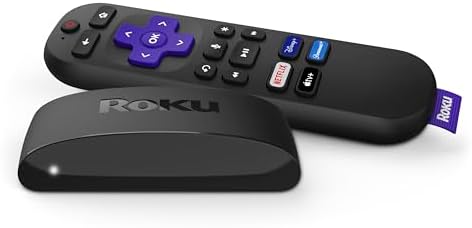
In today's digital age, the way we consume entertainment has transformed dramatically. Gone are the days of being tethered to a handful of cable channels. Now, a universe of content awaits, accessible through the magic of streaming. But with so many devices on the market, choosing the right streaming media player can feel like navigating a labyrinth. This guide is designed to cut through the clutter, offering a comprehensive look at what truly matters when selecting a device to bring your favorite shows, movies, and live TV into your living room. We'll explore the essential factors to consider, common mistakes to avoid, and highlight some excellent options, including the highly-rated Roku Express 4K+.
1. Why Streaming Media Players Deserve Careful Consideration
A streaming media player isn't just another gadget; it's the gateway to your entire digital entertainment library. The right device can elevate your viewing experience, offering stunning picture quality, seamless performance, and access to a vast array of content. Conversely, the wrong choice can lead to frustrating buffering, a clunky interface, and a limited selection of apps. Understanding the nuances of these devices is crucial for making an investment that enhances, rather than hinders, your home entertainment setup. Factors like resolution support, connectivity, ease of use, and the breadth of available services all play a significant role in the overall satisfaction you'll derive from your purchase.
2. Key Factors to Evaluate When Choosing a Streaming Media Player
To ensure you're making an informed decision, let's delve into the critical features that differentiate streaming media players. We'll ground these explanations in real specifications to give you a concrete understanding of what to look for.
a) Picture Quality: Resolution and HDR
This is arguably the most impactful feature for your viewing experience. Look for devices that support high resolutions like 4K (3840 x 2160 Pixels) and High Dynamic Range (HDR). 4K offers four times the pixels of Full HD, resulting in significantly sharper and more detailed images. HDR, on the other hand, enhances the contrast and color range, delivering brighter whites, deeper blacks, and a more vibrant, lifelike picture. The Roku Express 4K+, for instance, boasts a "Brilliant 4K picture quality" and supports "HDR color," ensuring your content looks its absolute best on compatible TVs.
b) Connectivity and Network Performance
A smooth streaming experience hinges on a stable internet connection. While most devices offer Wi-Fi connectivity, the quality of the Wi-Fi chip and its support for newer standards (like Wi-Fi 5 or 6) can make a difference. For the Roku Express 4K+, the product listing highlights "seamless streaming" and a "faster wireless network connection." It's also important to consider the ports available. Most modern players will have an HDMI connector for outputting to your TV. While the Roku Express 4K+ doesn't explicitly state its Wi-Fi standard, its focus on a fast wireless connection is a positive sign.
c) User Interface and Ease of Use
You'll be interacting with your streaming device daily, so an intuitive and user-friendly interface is paramount. This includes how easy it is to navigate menus, find content, and manage apps. Roku devices are widely praised for their simple, customizable home screen, where "your channels [are] front and center, plus automatic updates." The "Quick guided setup" mentioned for the Roku Express 4K+ also contributes to a hassle-free initial experience.
d) Remote Control and Voice Functionality
The remote is your primary tool for interacting with the device. Some players come with basic remotes, while others offer advanced options. The Roku Express 4K+ features a "Voice Remote" that allows you to "Power up your TV, adjust the volume, and control your Roku device all with one remote." Furthermore, its "Voice search & control" capability lets you "Quickly search, play entertainment, and control your streaming device with the voice remote." The ability to integrate with popular voice assistants like Siri, Alexa, or Hey Google is another significant convenience factor.
e) Content Availability and Supported Services
The true value of a streaming device lies in the content it can access. Ensure the device supports the streaming services you subscribe to or plan to use. Popular platforms like Netflix, Hulu, Prime Video, Disney+, and YouTube are common, but niche services might not be available on all platforms. The Roku Express 4K+ supports a wide range of services including "Hulu, Netflix, Pandora, Prime Video, Vudu," and notably, offers access to "350+ free live TV channels," significantly expanding your viewing options beyond paid subscriptions.
f) Processing Power and Storage
While often overlooked, the internal hardware can impact performance. RAM (Random Access Memory) and storage capacity influence how quickly apps load and how many apps you can install. The Roku Express 4K+ comes with 1 GB of RAM and 16 GB of Memory Storage Capacity, which is generally sufficient for smooth operation and a decent app library for a device in its category.
g) Form Factor and Design
Streaming devices come in various shapes and sizes, from small dongles that plug directly into your TV's HDMI port to larger boxes. The form factor often dictates how discreetly it can be placed. The Roku Express 4K+ is a "TV Box" with compact dimensions of "3"L x 1.6"W x 0.83"H," making it easy to tuck away behind your television. It also includes a "Removable Adhesive Strip" for mounting options.
3. Common Mistakes Buyers Make
To help you avoid buyer's remorse, here are some common missteps people make when purchasing a streaming media player:
- Overlooking Resolution Support: Buying a device that only supports HD when you have a 4K TV means you're not getting the best possible picture quality. Always match the device's capabilities to your TV's.
- Ignoring Connectivity Needs: If you have a large home or a less-than-ideal Wi-Fi setup, a device with weaker wireless performance will lead to constant buffering. Consider if Ethernet connectivity is important for your setup, though many smaller devices omit this.
- Underestimating Interface Complexity: A device that's difficult to navigate can quickly become frustrating. Opt for platforms known for their user-friendliness, especially if less tech-savvy individuals will be using it.
- Not Checking App Availability: Assuming all popular streaming services are available on every device is a common error. Verify that your must-have apps are supported before purchasing.
- Focusing Solely on Price: While budget is important, the cheapest option might lack essential features like 4K support, voice control, or access to key apps, leading to a less satisfying experience in the long run.
4. Price Tiers and What to Expect
Streaming media players span a wide price range, generally from under $30 to over $100. Understanding these tiers can help you set expectations:
- Budget Tier (Under $50): Devices in this range typically offer solid HD streaming and access to major apps. They might lack advanced features like 4K resolution, HDR support, or sophisticated voice remotes. However, they provide excellent value for basic streaming needs. The Roku Express 4K+, priced at $39.99, is a prime example of a device that punches well above its weight in this tier, offering 4K, HDR, and a voice remote, making it an exceptional deal.
- Mid-Range Tier ($50 - $100): This is where you'll find most devices offering 4K, HDR, and more robust performance. Features like faster processors, improved Wi-Fi, and more advanced remotes (often with voice search) are common. Many popular streaming sticks and boxes fall into this category, offering a good balance of features and performance.
- Premium Tier (Over $100): High-end devices in this tier often focus on cutting-edge features such as Dolby Vision and Dolby Atmos support, advanced gaming capabilities, faster processors for quicker app loading, and sometimes even built-in storage for offline content or app expansion. These are for users who demand the absolute best in performance and features.
The Roku Express 4K+ at $39.99 represents an outstanding value, offering features typically found in higher price brackets.
5. Top Recommendations by Use Case
Choosing the right device often depends on your specific needs:
- Best Overall Value & 4K Streaming: Roku Express 4K+
With its impressive 4.7/5 rating from over 102,000 reviews, the Roku Express 4K+ is a clear winner for many. It delivers brilliant 4K and HDR picture quality, a user-friendly interface, and a capable voice remote, all at an attractive price point of $39.99. Its support for major streaming services and a vast library of free content makes it incredibly versatile. The inclusion of features like "4K picture, HDR color" and "Voice search & control" at this price is remarkable. - For Smart Home Enthusiasts: Devices with Extensive Voice Assistant Integration
If you're heavily invested in a smart home ecosystem (e.g., Amazon Alexa, Google Assistant), look for devices that offer deep integration. While the Roku Express 4K+ works with Siri, Alexa, or Hey Google, some competitors might offer more seamless control within their respective ecosystems. - For Simplicity and Ease of Use: Roku Platform (Generally)
Roku devices, including the Express 4K+, are renowned for their straightforward interface. If you prioritize ease of navigation and quick setup, Roku is consistently a top choice. The "Quick guided setup" and "customizable home screen" are key benefits. - For Gamers or Power Users: Higher-End Devices
If you plan to use your streaming device for more than just watching movies and shows – perhaps casual gaming or running demanding apps – you'll want to look at more powerful, higher-priced options that offer faster processors and more RAM.
6. Frequently Asked Questions (FAQ)
Q1: Do I need a smart TV to use a streaming media player?
No, you do not need a smart TV. A streaming media player connects to any TV with an HDMI port, effectively turning a non-smart TV into a smart TV by providing access to streaming apps and services.
Q2: What is the difference between a streaming stick and a streaming box?
A streaming stick is a compact device that plugs directly into your TV's HDMI port, often powered by a USB cable. A streaming box is a small, separate unit that connects to your TV via an HDMI cable and usually requires its own power adapter. The Roku Express 4K+ is a box-style player.
Q3: How important is Wi-Fi speed for streaming?
Wi-Fi speed is critical. For HD streaming, a minimum of 5 Mbps is generally recommended, while 4K streaming requires at least 25 Mbps. A "faster wireless network connection," as highlighted for the Roku Express 4K+, ensures a smoother, buffer-free experience. Ensure your home network can support the demands of streaming.
Q4: Can I use a streaming device without paying for subscriptions?
Yes! Many streaming devices offer access to free content. The Roku Express 4K+, for example, provides access to "350+ free live TV channels" in addition to apps like YouTube. Many services also offer free, ad-supported tiers.
Q5: What does "HDR color" mean for my viewing experience?
HDR (High Dynamic Range) color expands the range of both contrast and color on your TV. This means you'll see more detail in the brightest and darkest parts of the image, along with a wider spectrum of colors, resulting in a more vibrant and lifelike picture compared to standard dynamic range (SDR).
Q6: How long is the warranty for the Roku Express 4K+?
The Roku Express 4K+ comes with a "1 Year Manufacturer Warranty," offering peace of mind for your purchase.
Actionable Tips for Buyers:
- Match Device Resolution to Your TV: Always ensure the streaming device supports at least the same resolution as your TV (e.g., 4K device for a 4K TV). The Roku Express 4K+ supports 4K and HDR, making it ideal for modern displays.
- Check Supported Services Before Buying: Make a list of the streaming apps you use most frequently and verify they are available on the device you're considering. The Roku platform offers broad compatibility with services like Netflix, Hulu, and Prime Video.
- Consider the Remote's Functionality: A remote that can control your TV's power and volume, along with voice search capabilities, significantly enhances convenience. The Roku Express 4K+'s voice remote is a major plus in this regard.
By carefully considering these factors and understanding the options available, you can confidently select a streaming media player that perfectly suits your entertainment needs and budget. The Roku Express 4K+ stands out as a particularly compelling choice, offering a rich feature set at an exceptional value, backed by a strong customer rating.