Introduction: Who This Category Is For and Why Choosing Carefully Matters
In today's connected world, a good webcam is no longer a luxury – it's a necessity. Whether you're a remote professional attending crucial video conferences, a student participating in online classes, a streamer building your audience, or simply staying in touch with loved ones, your webcam is your window to the digital world. Choosing the right webcam ensures you make a great impression, communicate effectively, and enjoy a seamless experience. With various options available, understanding the key factors can help you avoid common pitfalls and invest in a device that truly meets your needs.
Key Factors to Consider
When selecting a webcam, several technical specifications and features significantly impact your experience. Focusing on these can help you narrow down your choices and find a model that offers the best performance for your budget.
Video Resolution and Frame Rate
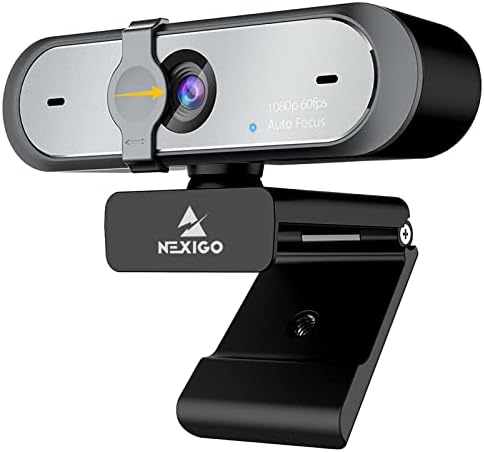
- Resolution: This refers to the clarity and detail of the image. Common resolutions include 1080p (Full HD) and 2K. For instance, the Anker PowerConf C200 offers 2K Ultra-Clear Resolution, providing sharp, detailed video. The Logitech C920x and NexiGo N660P both deliver Full HD 1080p video.
- Frame Rate (fps): This determines how smooth the video motion appears. 30 fps is standard for many applications, while 60 fps offers a smoother, more fluid experience, especially for dynamic content. The NexiGo N660P stands out with its 1080p at 60fps capability, ideal for gaming or fast-paced streaming.
Audio Quality
- Microphones: Most webcams include built-in microphones. Look for features like dual mics and noise-cancellation technology for clearer audio. The Anker PowerConf C200 boasts Advanced Audio Clarity with AI Noise Cancellation, and the NexiGo N660P features Built-in Dual Stereo Noise-Cancelling Microphones. The Logitech C920S also offers Stereo audio with dual mics.
- Audio Capture Range: Some microphones are designed to capture audio clearly from a specific distance. The Logitech C920e features two integrated omnidirectional microphones that capture audio clearly from up to one meter away.
Lighting and Focus Features
- Autofocus: This feature automatically adjusts the lens to keep your image sharp, even if you move. Many models, like the Logitech C920x and NexiGo StreamCam N930E, include autofocus for convenience.
- Light Correction: Webcams with automatic light adjustment, such as the Logitech C920x's HD lighting adjustment or the Logitech Brio 101's Auto-Light Balance (RightLight), can significantly improve image quality in low-light or challenging lighting conditions. The Anker PowerConf C200 also offers Superior Low-Light Performance.
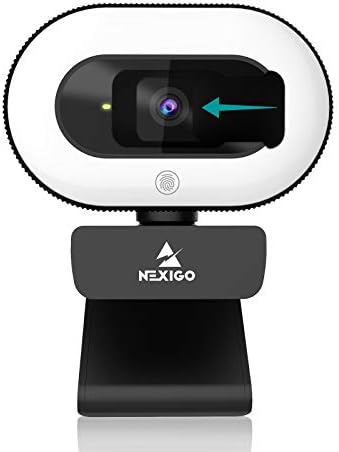
- Built-in Lighting: Some webcams incorporate lighting solutions. The NexiGo StreamCam N930E features a Three Level Adjustable Ring Light, offering customizable illumination directly from the webcam.
Privacy and Security
- Privacy Shutter: A physical cover that slides over the lens provides complete privacy when the webcam is not in use. The Anker PowerConf C200 has an integrated cover, the NexiGo N660P includes a privacy cover, and the Logitech C920S comes with a privacy shutter. The Logitech Brio 101 also features a slide for privacy.
Connectivity and Compatibility
- Plug and Play: Most modern webcams are plug-and-play, meaning they work immediately upon connecting to your computer without needing to install drivers. The NexiGo N660P and NexiGo StreamCam N930E highlight this feature.
- Operating System Support: Ensure the webcam is compatible with your operating system. Most webcams support a wide range, including Windows and macOS. For example, the NexiGo N660P is compatible with Windows 7/8/10/11, Mac OS 10.6 and higher, and more.
Price & Value
Webcams span a range of prices, and understanding what you get at different price points can help you make a smart investment. We'll look at the current prices of the models provided to illustrate this.
- Under $50: In this range, you can find capable webcams for basic needs. The Logitech Brio 101 is available for $37.79, offering Full HD 1080p resolution, auto-light balance, and a privacy slide. The NexiGo StreamCam N930E is priced at $49.99 and includes a built-in ring light and 1080p resolution.
- $50 - $70: This segment offers enhanced features and performance. The Anker PowerConf C200 is $59.99 and provides 2K resolution with AI noise cancellation. The NexiGo N660P is also $59.99, offering 1080p at 60fps and noise-canceling mics. The Logitech C920S is $64.49 and includes a privacy shutter and 1080p video. The Logitech C920e is priced at $69.48, certified for Zoom and Teams with clear audio and autofocus. The Logitech C920x is $69.99, featuring 1080p video, HD lighting adjustment, and autofocus.
- Around $100: At this price point, you often find specialized devices. The Elgato Cam Link 4K is $99.99, but it's a capture card designed to turn your DSLR or camcorder into a professional webcam, offering up to 4K60 capture. This is a different category of device compared to standard webcams.
Common Mistakes to Avoid
Navigating the webcam market can present a few common challenges. Being aware of these can help you make a more informed decision.
- Overlooking Audio Quality: While video quality is important, poor audio can be just as detrimental to communication. Ensure the webcam has decent microphones, ideally with noise-canceling features, especially if you'll be in noisy environments. Models like the Anker PowerConf C200 and NexiGo N660P emphasize their audio capabilities.
- Ignoring Lighting Conditions: A webcam that performs poorly in low light can lead to grainy or dark images. Look for features like automatic light correction or built-in lighting. The Logitech C920x and Anker PowerConf C200 are noted for their low-light performance.
- Not Considering Privacy Needs: In an era of increasing digital awareness, a physical privacy shutter is a valuable feature. If privacy is a concern, prioritize webcams that include this, such as the Logitech C920S or the Anker PowerConf C200.
- Buying Based Solely on Resolution: While higher resolution like 2K (Anker PowerConf C200) is appealing, it's not the only factor. Frame rate, low-light performance, and audio quality are equally crucial for a good overall experience. A 1080p webcam with excellent light correction might outperform a higher-resolution model with poor lighting adjustments.
How to Judge Quality
Assessing the quality of a webcam doesn't require you to be a tech expert. By looking at the provided ratings and review counts, you can get a solid understanding of user satisfaction and product reliability.
- Aggregate Ratings: Look for webcams with high average ratings. For example, the Logitech C920x, Elgato Cam Link 4K, and Logitech C920e all boast an impressive 4.6/5 rating. This indicates a high level of general satisfaction among users.
- Review Volume: A high number of reviews suggests that many people have purchased and used the product, providing a larger sample size for the aggregate rating. The Logitech C920x has a substantial 21,754 reviews, while the Elgato Cam Link 4K has 13,822 reviews. A high rating combined with a large number of reviews generally points to a reliable and well-regarded product.
- Contextualizing Ratings: Consider the rating in relation to the price and features. A 4.4/5 rating on a budget-friendly webcam like the Logitech Brio 101 (priced at $37.79) is excellent value. Similarly, the Anker PowerConf C200 at $59.99 with a 4.4/5 rating from 8,978 reviews offers strong performance for its price.
- Use the Data Provided: Always ground your assessment in the verified data. For instance, the Logitech C920x is rated 4.6/5 from 21,754 reviews, and the NexiGo N660P is rated 4.5/5 from 7,075 reviews. This allows you to compare user satisfaction directly based on the available information.
Real Options at a Glance
- Logitech C920x HD Pro PC Webcam: A solid all-around performer for general use, offering great HD quality and lighting adjustment.
- Elgato Cam Link 4K Capture Card: For users with DSLRs or camcorders who need professional-grade video input up to 4K.
- Anker PowerConf C200 2K Webcam: Excellent for professional conferences with its 2K resolution and AI noise cancellation.
- NexiGo N660P 1080P 60FPS Webcam: A great choice for gamers and streamers needing smooth 60fps video and good audio.
- NexiGo StreamCam N930E: An affordable option with a built-in ring light for improved self-illumination.
- Logitech Brio 101 Full HD Webcam: A compact and budget-friendly option for everyday video calls with essential features.
- Logitech C920e HD Webcam: Tailored for business use, certified for Zoom and Teams with a focus on clear audio and video.
- Logitech C920S HD Pro Webcam: Ideal for privacy-conscious users with its integrated physical shutter and reliable 1080p performance.