Introduction
In today's connected world, the number of devices needing a USB port often outnumbers the ports available on our computers. This is where USB hubs come in, acting as essential bridges to expand your connectivity. Whether you're a creative professional needing to connect multiple peripherals, a student managing coursework, or simply looking to declutter your workspace, choosing the right USB hub can significantly enhance your productivity and user experience. It's not just about adding more ports; it's about ensuring those ports deliver the speed, power, and compatibility you need. Carefully selecting a hub means avoiding frustrating bottlenecks and ensuring your devices work seamlessly together.
Key Factors to Consider
When evaluating USB hubs, several key specifications and features will dictate how well a hub meets your needs. Understanding these will help you navigate the options and make a choice that aligns with your workflow.
Port Types and Quantity
- USB-A vs. USB-C: Most modern hubs offer a mix of USB-A (the traditional rectangular connector) and USB-C ports. USB-C is the latest standard, offering higher speeds and power delivery capabilities.
- Data Transfer Speeds: Look for USB 3.0 (also known as USB 3.1 Gen 1 or USB 3.2 Gen 1) ports for speeds up to 5 Gbps, which is ideal for external hard drives and flash drives. USB 2.0 ports, with speeds up to 480 Mbps, are generally sufficient for keyboards, mice, and other less data-intensive peripherals. For example, the TOTU 11-in-1 USB-C Hub offers both 2x USB 3.0 ports for fast data syncing and 2x USB 2.0 ports, suitable for peripherals like a mouse or keyboard. The minisopuru Mac mini Dock takes it a step further with 2x 10Gbps USB-C 3.2 Gen2 ports for exceptionally fast data transfer.
- Power Delivery (PD): If you plan to charge your laptop through the hub, ensure it supports USB Power Delivery (PD). This allows the hub to pass power from your laptop's adapter through the hub to charge your device. The EUASOO 11 in 1 Triple Display USB C Docking Station and the TOTU 11-in-1 USB-C Hub both support PD charging up to a maximum of 87W, ensuring your laptop stays powered even when connected to multiple peripherals.
- Video Output: Many hubs include HDMI or DisplayPort outputs to connect external monitors. Pay attention to the supported resolutions and refresh rates. The EUASOO 11 in 1 Triple Display USB C Docking Station offers dual 4K HDMI ports, supporting up to 4K@30Hz for a single monitor, and up to 2K@60Hz when using triple display on Windows systems. The TOTU 11-in-1 USB-C Hub also provides 4K HDMI output, but notes that when HDMI and VGA are used simultaneously, the maximum resolution for both is 1080P and the display will only duplicate, not extend.
- Other Ports: Consider if you need additional ports like Ethernet (RJ-45), SD card readers, TF card readers, or audio jacks. The TOTU 11-in-1 USB-C Hub is a prime example of extensive capability, featuring an Ethernet port, SD and TF card readers (usable simultaneously), and an audio port, alongside its video and USB options. Similarly, the EUASOO 11 in 1 Triple Display USB C Docking Station includes an Ethernet RJ-45 port, SD card reader, TF card reader, and a 3.5mm Audio/mic jack.
Compatibility
Ensure the hub is compatible with your operating system (Windows, macOS, Linux) and your specific device models. Some hubs are designed with particular systems in mind. For instance, the EUASOO 11 in 1 Triple Display USB C Docking Station explicitly states that triple display functionality is only supported on Windows systems, while macOS only supports mirror mode. The minisopuru Mac mini Dock is specifically designed for Mac Mini models with Type-C ports (2018 and later) and offers unique internal storage expansion capabilities for these devices.
Power Requirements
For hubs with many ports or those powering high-demand devices, a powered hub with an included AC adapter is often necessary. This prevents your computer's USB port from being overloaded. The j5create 7-Port Powered USB 3.0 Data Hub comes with a 20W power adapter, supporting both USB bus-powered and DC self-powered modes for power-hungry devices. Even with PD charging, it's often recommended to use your laptop's original power adapter for optimal charging, as noted by both the EUASOO and TOTU hubs.
Price & Value
USB hubs vary significantly in price, and the cost often reflects the number of ports, speed, build quality, and additional features like video output or PD charging. Understanding these tiers can help you find the best value for your budget.
- Budget-Friendly (Under $50): In this range, you can find hubs that offer essential connectivity. The j5create 7-Port Powered USB 3.0 Data Hub is priced at $39.99 and provides 7 USB 3.0 ports, fast charging capabilities, and an included power adapter. The minisopuru Mac mini Dock, at $49.89, offers a specialized solution with internal SSD expansion for Mac Minis, alongside USB-C data ports and card readers.
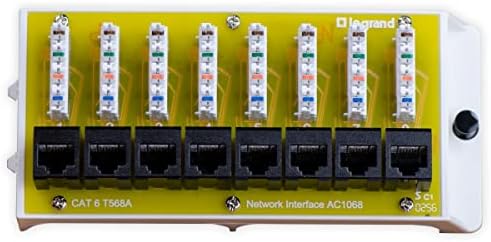
- Mid-Range ($50 - $70): This segment typically offers more ports, higher speeds, and advanced features like 4K video output and robust PD charging. The TOTU 11-in-1 USB-C Hub sits at $51.99, providing an impressive 11-in-1 functionality including 4K HDMI, Ethernet, and multiple USB ports. The EUASOO 11 in 1 Triple Display USB C Docking Station is available for $69.99, boasting dual 4K HDMI outputs and triple display support for Windows users. The On-Q Cat 6 Network Interface Module, priced at $58.74, is a more specialized option focused on providing 8-port Ethernet connectivity for home networks.
- Higher-End (Over $100): While not represented in the current selection, hubs in this category often offer even more advanced features, such as Thunderbolt support, higher bandwidth, or a greater number of specialized ports for professional use. The MokerLink 26 Port Gigabit PoE Switch at $168.99 is an example of a high-capacity networking device, though it serves a different purpose than a typical computer USB hub, focusing on network infrastructure rather than peripheral expansion for a single computer.
Value isn't just about the lowest price; it's about getting the features you need at a reasonable cost. A hub like the TOTU 11-in-1 at $51.99 offers a vast array of functionalities for its price point, making it a strong contender for those needing extensive connectivity.
Common Mistakes to Avoid
Shoppers can sometimes overlook critical details when purchasing a USB hub, leading to dissatisfaction. Being aware of these common pitfalls can save you time and money.
- Ignoring Compatibility: Not all hubs work with all operating systems or devices. Double-check that the hub explicitly supports your computer's OS and specific model, especially for features like video output or charging. For example, the EUASOO hub's triple display feature is limited to Windows.
- Underestimating Power Needs: If you plan to connect multiple high-power devices (like external SSDs or charging tablets), a bus-powered hub might not suffice. Opt for a powered hub, like the j5create JUH377, which includes an external power adapter.
- Overlooking Data Speeds: Using a USB 2.0 hub for tasks requiring high data transfer, such as editing video from an external drive, will result in slow performance. Ensure your hub has USB 3.0 or higher ports for these applications, like the minisopuru Mac mini Dock with its 10Gbps USB-C ports.
- Confusing Hubs with Docking Stations: While the terms are often used interchangeably, true docking stations often offer more advanced features like dedicated display outputs, higher power delivery, and sometimes even built-in storage solutions, as seen with the minisopuru Mac mini Dock's M.2 SSD support. A simple hub primarily expands USB ports.
- Not Checking Specific Device Limitations: Some manufacturers, like HP, may restrict charging from third-party accessories. Both the TOTU and EUASOO hubs mention that HP devices may require their original chargers due to manufacturer restrictions.
How to Judge Quality
Assessing the quality of a USB hub involves looking beyond just the listed features. Customer feedback, as reflected in ratings and review counts, provides valuable insights.
When examining customer feedback, focus on the aggregate rating and the number of reviews. A high rating, such as the On-Q Cat 6 Network Interface Module's 4.6/5 rating, suggests general customer satisfaction. However, it's also important to consider the volume of reviews. A rating based on a few reviews might not be as reliable as one supported by hundreds or thousands. For instance, the TOTU 11-in-1 USB-C Hub has a solid 4.4/5 rating based on 1,930 reviews, indicating a well-received product by a large user base. Similarly, the EUASOO 11 in 1 Triple Display USB C Docking Station has a 4.3/5 rating from 1,816 reviews.
While we don't have access to individual reviews, a high review count paired with a good rating generally points to a product that consistently meets user expectations. It suggests that the product's performance, build quality, and feature set are reliable for a significant number of users. Conversely, a low rating or a very low review count might indicate potential issues or a niche product that hasn't gained widespread approval.
Real Options at a Glance
- TOTU 11-in-1 USB-C Hub ($51.99, 4.4/5 from 1,930 reviews): Best for extensive connectivity with a wide array of ports.
- EUASOO 11 in 1 Triple Display USB C Docking Station ($69.99, 4.3/5 from 1,816 reviews): Ideal for Windows users needing multiple display outputs and robust port selection.
- MokerLink 26 Port Gigabit PoE Switch ($168.99, 4.4/5 from 603 reviews): A high-capacity networking solution for infrastructure, not typical computer peripheral expansion.
- minisopuru Mac mini Dock ($49.89, 4.3/5 from 549 reviews): A specialized stand and hub for Mac Mini users, offering internal SSD expansion.
- On-Q Cat 6 Network Interface Module ($58.74, 4.6/5 from 350 reviews): Suited for dedicated home network Ethernet expansion within OnQ enclosures.
- j5create 7-Port Powered USB 3.0 Data Hub ($39.99, 4.6/5 from 210 reviews): A solid, powered option for adding multiple USB 3.0 ports with fast charging capability.