Introduction
Choosing the right monitor can significantly enhance your computing experience, whether you're a gamer seeking immersive visuals, a creative professional demanding color accuracy, or a student or office worker needing a comfortable and productive workspace. With a wide range of options available, understanding the core specifications and features is crucial. This guide will walk you through the essential factors to consider, using real products as examples to illustrate the choices available in today's market.
Key Factors to Consider
When selecting a monitor, several technical specifications play a vital role in determining its performance and suitability for your needs. Let's break down the most important ones:
Display Size and Resolution
The physical size of the screen and the number of pixels it displays (resolution) directly impact clarity and workspace. Common resolutions include Full HD (1920x1080), which is standard for many 22-inch to 24-inch monitors like the Sceptre E248W-19203R (24-inch, 1080p) or the KOORUI 22-inch monitor. Larger or higher-resolution displays offer more detail and screen real estate.
Color Gamut and Accuracy
For tasks involving visual content creation or simply enjoying vibrant images, color gamut is important. This refers to the range of colors a monitor can display. A wider color gamut, such as 99% sRGB found in the Sceptre E248W-19203R and the KOORUI 22-inch monitor, or even 110% sRGB on the SANSUI 24-inch Gaming Monitor, means more accurate and richer color reproduction compared to standard monitors.
Refresh Rate and Response Time
These specifications are particularly critical for gamers and those who work with fast-moving visuals. The refresh rate (measured in Hz) indicates how many times per second the screen updates its image. A higher refresh rate results in smoother motion. For instance, the SANSUI 24-inch Gaming Monitor boasts an impressive 180Hz, while the KOORUI 22-inch and SANSUI 22-inch monitors offer 120Hz. The Sceptre E248W-19203R supports up to 100Hz.
Response time (often measured in milliseconds, ms) refers to how quickly a pixel can change color. A lower response time reduces motion blur and ghosting. The SANSUI 24-inch Gaming Monitor lists a 1ms MPRT response time, which is excellent for fast-paced gaming.
Curved vs. Flat Displays
Monitors come in both flat and curved designs. Curved monitors, like the Sceptre C248W-1920RN with its 1800R curve, are designed to enhance immersion by wrapping the image around the viewer. This can be particularly appealing for gaming and cinematic experiences.
Connectivity Options
Ensure the monitor has the ports you need. Common options include HDMI and VGA. Some monitors, like the KOORUI 22-inch and SANSUI 24-inch models, offer multiple HDMI ports. Portable monitors, such as the KYY Portable Monitor and MNN Portable Monitor, often feature USB-C (Type-C) ports, which can carry both display signal and power, simplifying connections. Always check compatibility, especially with USB-C, as devices need to support Thunderbolt 3 or DP Alt Mode.
Built-in Speakers and Audio
Some monitors include built-in speakers, offering a convenient, space-saving audio solution. The Sceptre E248W-19203R and Sceptre C248W-1920RN both feature built-in speakers. However, many monitors, like the SANSUI models and the portable monitors, do not have them, requiring external speakers or headphones via an audio jack.
Eye Care Features
For extended use, eye comfort is paramount. Many monitors now include features like Blue Light Shift (as seen on the Sceptre E248W-19203R), flicker-free technology, and anti-glare coatings to reduce eye strain. The KOORUI 22-inch monitor is TÜV Rheinland Certified for low blue light and flicker-free operation.
Portability
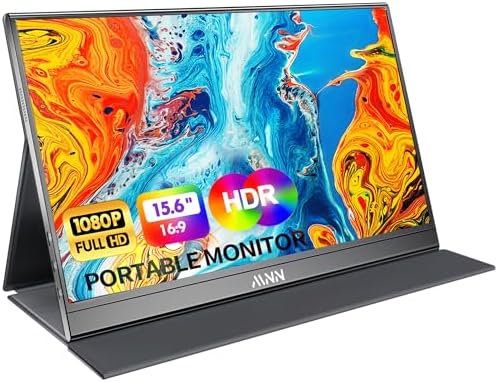
If you need a monitor for on-the-go use, portable monitors like the KYY Portable Monitor (15.6-inch, 1.7lb) and MNN Portable Monitor (15.6-inch, 1.53lb) are designed for travel. They are typically ultra-slim and lightweight, often including protective covers that double as stands.
Price & Value
Monitor prices vary widely based on features and performance. Here's a look at the current pricing for the models we've examined:
- Under $70: The KYY Portable Monitor is available for $62.99, and the MNN Portable Monitor is priced at $49.99. These offer good value for portable solutions. The KOORUI 22-inch monitor is also competitively priced at $69.98.
- $70 - $90: This range includes several solid options. The SANSUI 22-inch monitor is $69.99, the SANSUI 24-inch (100Hz) is $79.99, and the Sceptre E248W-19203R is $80.97. The Sceptre Curved 24-inch is priced at $82.97, and the SANSUI 24-inch Gaming Monitor is $84.99.
- Above $90: While none of the listed products currently fall significantly above this, higher-end monitors with advanced features like 4K resolution, higher refresh rates, or specialized panels can command prices well over $100.
When evaluating value, consider the combination of features, performance, and the number of user reviews. A monitor like the Sceptre E248W-19203R, priced at $80.97 with a 4.6/5 rating from over 28,000 reviews, represents a strong balance of features and customer satisfaction.
Common Mistakes to Avoid
Navigating the monitor market can lead to a few common pitfalls. Being aware of these can save you time and ensure you get a display that truly meets your needs.
- Ignoring Refresh Rate for Gaming: If you're a gamer, settling for a low refresh rate (e.g., 60Hz) can lead to a less fluid and responsive experience. Monitors like the SANSUI 24-inch Gaming Monitor with 180Hz are built for speed.
- Overlooking Connectivity: Ensure the monitor has the correct ports for your devices. For example, if you plan to connect a modern laptop via USB-C, confirm the monitor supports it, as not all do. The KYY and MNN portable monitors are good examples of devices with robust USB-C connectivity.
- Assuming All "HD" is Equal: While many monitors are Full HD (1920x1080), higher resolutions like QHD or 4K offer significantly more detail, especially on larger screens. For standard use, 1080p is often sufficient, as seen on the Sceptre E248W-19203R.
- Forgetting About Ergonomics: A monitor that doesn't tilt or adjust can lead to discomfort during long sessions. Look for adjustable stands or VESA mount compatibility for flexible positioning, a feature highlighted in monitors like the KOORUI 22-inch and SANSUI 22-inch.
- Not Considering Built-in Speakers: If you rely on monitor speakers for casual audio, double-check if the model includes them. Many gaming-focused or budget monitors omit them, like the SANSUI models.
How to Judge Quality
When evaluating a monitor, user feedback provides invaluable insights into real-world performance and reliability. Aggregate ratings and review counts offer a quantifiable measure of customer satisfaction.
For example, the Sceptre 24-inch Prime Monitor (E248W-19203R) has an impressive 4.6/5 rating from 28,507 reviews. This high rating, combined with a substantial number of reviews, suggests a consistently positive user experience. Similarly, the KOORUI 22-inch monitor holds a 4.5/5 rating from 15,117 reviews, indicating strong customer approval.
When looking at portable monitors, the KYY Portable Monitor has a 4.4/5 rating from 12,791 reviews, while the MNN Portable Monitor has a 4.3/5 rating from 11,303 reviews. These figures provide a solid basis for comparison, showing that both are well-received by a large number of users.
A lower review count, even with a high rating, might indicate a newer product or a more niche item. For instance, the SANSUI 24-inch Gaming Monitor has a 4.5/5 rating from 7,222 reviews. While excellent, it's worth noting the review volume compared to some other models.
Always consider both the rating and the number of reviews. A high rating with very few reviews might be less reliable than a slightly lower rating with thousands of reviews. This approach helps you gauge the overall sentiment and reliability of a product based on a broad user base.
Real Options at a Glance
- Sceptre 24-inch Prime Monitor (E248W-19203R): Best for general use and good color coverage at a great price (4.6/5 from 28,507 reviews).
- Sceptre Curved 24-inch Gaming Monitor (C248W-1920RN): Best for immersive viewing with its curved display (4.6/5 from 22,583 reviews).
- KOORUI New 22 Inch Computer Monitor: Best for a high refresh rate (120Hz) and eye-care features in a compact size (4.5/5 from 15,117 reviews).
- KYY Portable Monitor 15.6-inch: Best for portability and versatile connectivity (4.4/5 from 12,791 reviews).
- MNN Portable Monitor 15.6-inch: Best budget portable monitor with essential features (4.3/5 from 11,303 reviews).
- SANSUI Gaming Monitor 24 Inch: Best for high-speed gaming with a 180Hz refresh rate and 1ms response time (4.5/5 from 7,222 reviews).
- SANSUI 22 Inch 120Hz Monitor: Best for balanced performance in home/office settings with good color accuracy (4.4/5 from 6,891 reviews).
- SANSUI Monitor 24 Inch 100Hz: Best for a stable 100Hz refresh rate and ergonomic design for everyday use (4.5/5 from 5,888 reviews).