Introduction
Welcome to your essential guide for navigating the world of Xbox One accessories. Whether you're looking to enhance your existing setup or find the perfect starter kit, choosing the right gear can significantly elevate your gaming experience. This guide is designed for Canadian consumers who want to make informed, considered purchases. We'll break down the key factors, discuss value, and help you avoid common mistakes, all grounded in real product data.
Key Factors to Consider
When selecting accessories for your Xbox One, several factors can make a big difference. Understanding these will help you find products that meet your specific needs and preferences.
Connectivity and Compatibility
- Wired vs. Wireless: Many accessories, like keyboards and mice, offer both wired and wireless options. Wireless provides a cleaner setup, but wired connections often guarantee a more stable connection, crucial for competitive gaming. For example, the RedThunder K62 Wireless Gaming Keyboard & Mouse Combo (CA$55.99, 4.1/5 from 565 reviews) offers wireless convenience with a 2.4G high-speed transmission, while the RedThunder K10 Wired Gaming Keyboard and Mouse (CA$59.99, 4.5/5 from 1,830 reviews) prioritizes a stable, wired connection.
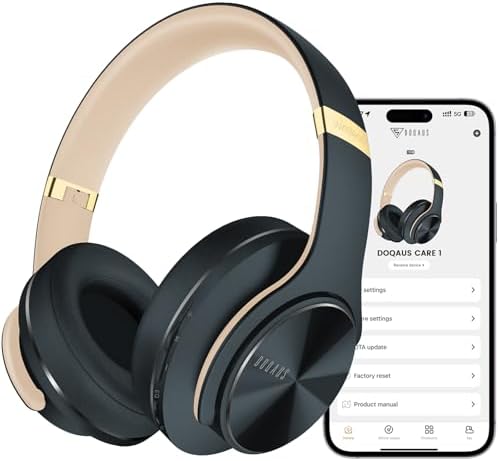
- Platform Support: Always confirm that your chosen accessory explicitly supports Xbox One. While many PC peripherals also work with Xbox, it's not always guaranteed. Products like the Logitech G920 Driving Force Racing Wheel (CA$379.99, 4.5/5 from 21,504 reviews) clearly state compatibility with Xbox and PC, whereas others, like the DOQAUS Bluetooth Headphones (CA$39.99, 4.4/5 from 8,141 reviews), focus on broader device compatibility but are useful for PC gaming alongside consoles.
Performance and Features
- Audio Quality: For an immersive experience, headphones are key. The Turtle Beach Stealth 700 Wireless Multiplatform Gaming Headset (CA$189.99, 4.2/5 from 11,399 reviews) boasts 60mm Eclipse Dual Drivers for spatial audio and an AI-based noise-cancelling mic, indicating a focus on high-fidelity sound and clear communication.
- Input Precision: For games requiring quick reflexes, precise inputs are vital. The Turtle Beach Rematch Advanced Wired Gaming Controller (CA$54.78, 4.1/5 from 950 reviews) features 2-stop true Hall effect hair triggers for faster reaction times and mappable back buttons for customizable gameplay. Similarly, gaming mice like the one in the RedThunder 60% Gaming Keyboard and Mouse Combo (CA$42.29, 4.1/5 from 1,891 reviews) offer high DPI (7200) and scan rates for responsive tracking.
- Durability and Build Quality: Look for materials and construction that suggest longevity. The Logitech G920 Driving Force mentions a hand-stitched leather cover, suggesting premium materials. For keyboards, features like water-resistance and reinforced cables, as seen in the RedThunder 60% Gaming Keyboard and Mouse Combo, contribute to durability.
- Comfort: Extended gaming sessions demand comfort. The DOQAUS Bluetooth Headphones highlight cloud-like comfort with memory foam and an adjustable headband. The RedThunder K10 Wired Gaming Keyboard and Mouse combo also includes a soft leather wrist rest for added relaxation.
Power and Battery Life
- Power Supply: For the Xbox One console itself, a reliable power supply is essential. The Ponkor Power Supply for Xbox One [Latest Version] (CA$44.99, 4.3/5 from 25,824 reviews) offers auto voltage (100-240V) for global use and improved cooling for quieter, longer operation.
- Rechargeable Batteries: For wireless accessories, battery life is a major consideration. The Turtle Beach Stealth 700 Headset offers an impressive 80-hour battery life, while the DOQAUS Bluetooth Headphones promise up to 90 hours of playtime. The RedThunder K62 Wireless Combo includes rechargeable batteries (1850 mAh for keyboard, 500 mAh for mouse) with smart energy-saving functions.
Price and Value
Understanding the price points of Xbox One accessories can help you find the best value for your budget. Prices can vary significantly based on features, brand reputation, and target audience.
- Budget-Friendly Options (Under CA$50): In this range, you can find essential accessories that offer good functionality. The Ponkor Power Supply at CA$44.99 provides a crucial component for your console, backed by a high review count. The DOQAUS Bluetooth Headphones at CA$39.99 offer exceptional battery life and app control. Keyboard and mouse combos like the RedThunder 60% Gaming Keyboard and Mouse Combo (CA$42.29) and the RedThunder K62 Wireless Combo (CA$55.99, though slightly above this tier) provide solid entry-level gaming peripherals.
- Mid-Range Choices (CA$50 - CA$200): This segment offers more advanced features and improved performance. The Turtle Beach Rematch Wired Gaming Controller at CA$54.78 provides enhanced control options. Moving up, the RedThunder K10 Wired Gaming Keyboard and Mouse Combo (CA$59.99) offers a full-size keyboard with a wrist rest. The Turtle Beach Stealth 700 Wireless Headset at CA$189.99 stands out with its extensive battery life and advanced audio features, representing a significant investment in sound quality.
- Premium Investments (Over CA$200): For dedicated enthusiasts, higher-priced items offer specialized experiences. The Logitech G920 Driving Force Racing Wheel at CA$379.99 is a prime example, offering an immersive racing simulation experience that justifies its price for fans of the genre.
Common Mistakes to Avoid
Making a hasty purchase can lead to disappointment. Here are a few common pitfalls to steer clear of:
- Ignoring Compatibility: The most critical mistake is buying an accessory that isn't compatible with the Xbox One. Always double-check the product description for explicit Xbox One support.
- Overpaying for Unnecessary Features: While advanced features can be appealing, consider if you'll actually use them. A high-end racing wheel like the Logitech G920 Driving Force is fantastic for racing sims but overkill for casual gaming. Similarly, paying a premium for features you won't utilize on a headset or controller can be wasteful.
- Underestimating Build Quality: Cheaper accessories might seem like a good deal initially, but they can break easily, leading to more frequent replacements. Look for products with robust materials and positive feedback on durability, such as the steel plate in the RedThunder K10 Keyboard or the premium materials mentioned for the Logitech G920.
- Forgetting the Power Supply: If you're buying a used console or suspect your original power brick is failing, ensure you get a reliable replacement like the Ponkor Power Supply. A faulty power supply can cause performance issues or even damage your console.
How to Judge Quality
Assessing the quality of an accessory often comes down to understanding the available data, particularly user ratings and review counts. This provides a valuable, albeit aggregate, perspective.
- Ratings and Review Counts: A high rating (e.g., 4.0/5 or higher) combined with a substantial number of reviews suggests a product that generally satisfies users. For instance, the Ponkor Power Supply has a 4.3/5 rating from over 25,000 reviews, indicating widespread user satisfaction with this critical component. The Logitech G920 Driving Force, with a 4.5/5 rating from over 21,000 reviews, points to a highly regarded premium peripheral.
- Interpreting Review Volume: A large number of reviews, like the 11,399 for the Turtle Beach Stealth 700 Headset (4.2/5), lends significant weight to the average rating. Conversely, a high rating with very few reviews might be less reliable. For example, a product with a 4.8/5 from only 50 reviews warrants more scrutiny than one with a 4.3/5 from 25,000 reviews.
- Focus on Consistent Performance: Look for products where the key features align with the positive feedback. If a headset boasts long battery life and users consistently mention this in their reviews (indicated by the high rating and count), it's a good sign. The DOQAUS Bluetooth Headphones, with a 4.4/5 rating from over 8,000 reviews, highlight 90 hours of playtime as a key feature.
Real Options at a Glance
- Ponkor Power Supply for Xbox One: Best for console power reliability, with a high rating from numerous reviews.
- Logitech G920 Driving Force: Best for dedicated racing simulation enthusiasts seeking an immersive experience.
- Turtle Beach Stealth 700 Headset: Best for immersive audio and long wireless gaming sessions.
- DOQAUS Bluetooth Headphones: Best for extended battery life and customizable EQ settings for versatile listening.
- RedThunder 60% Gaming Keyboard and Mouse Combo: Best for gamers seeking a compact, RGB-lit setup on a budget.
- RedThunder K10 Wired Gaming Keyboard and Mouse Combo: Best for a full-size, durable wired gaming setup with added wrist comfort.
- Turtle Beach Rematch Wired Gaming Controller: Best for enhanced controller customization and faster reaction times.
- RedThunder 60% Wireless Gaming Keyboard & Mouse Combo: Best for a compact, rechargeable wireless setup balancing gaming and general use.
![Power Supply for Xbox One [Latest Version] Replacement Power Brick Power Box for Xbox one Adapter AC Power Cord Cable 100-240V Auto Voltage](https://m.media-amazon.com/images/I/41rsL7Ose9L._AC_SL1200_.jpg)