Introduction: Elevating Your PC Experience
Welcome to the PC accessories buying guide! Whether you're a seasoned gamer, a creative professional, or someone who spends hours working at their computer, the right peripherals can dramatically enhance your experience. Choosing carefully matters because the right gear isn't just about comfort; it's about performance, efficiency, and long-term satisfaction. We'll explore key factors, understand value, and learn how to avoid common pitfalls using real-world examples.
Key Factors to Consider
When selecting PC accessories, several core features and specifications significantly impact your daily use. Understanding these will help you make a choice that aligns with your needs.
Input Devices: Mice and Keyboards
Input devices are your primary interface with your computer. For mice, consider sensor technology, connectivity, and ergonomics. For keyboards, look at layout, switch type, and connectivity options.
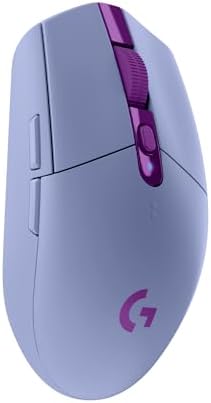
- Sensor Performance (Mice): The optical sensor is crucial for accuracy. The Logitech G305 Lightspeed features an optical HERO sensor with up to 12,000 DPI sensitivity and 400 IPS precision. Similarly, the Razer Orochi V2 boasts a 5g advanced 18k DPI optical sensor. Higher DPI generally means greater sensitivity, allowing for finer control, especially important for gaming or detailed design work.
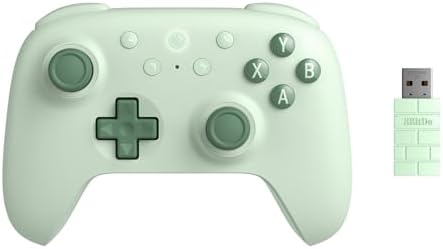
- Connectivity: Wired vs. Wireless: Wireless technology has advanced significantly, offering lag-free experiences. The Logitech G305 uses LIGHTSPEED wireless with a 1ms report rate for competition-level performance. The Razer Orochi V2 offers two wireless modes: Bluetooth for battery life and Razer HyperSpeed wireless for low latency. The 8Bitdo Ultimate 2C Controller supports a 1000Hz polling rate over both 2.4G and wired connections, while the 8Bitdo Ultimate 2 Wireless Controller offers an ultra-low latency 2.4G connection under 1ms with its "8Speed" wireless technology.
- Ergonomics and Design: Comfort is paramount, especially for extended use. The Razer BlackShark V2 X headset is noted for its lightweight design at just 240g and breathable memory foam ear cushions. The Razer Orochi V2 mouse is designed to be ultra-lightweight, under 60g (excluding battery), for seamless control. Keyboards like the EPOMAKER x Aula F75 offer a compact 75% layout and gasket structure for comfort and reduced fatigue.
- Durability and Build Quality: Look for features that indicate longevity. The Razer Orochi V2 features 2nd-gen Razer mechanical mouse switches with a lifespan of up to 60 million clicks. The 8Bitdo Ultimate 2C Controller boasts Hall Effect joysticks and Hall triggers, known for their wear resistance. The EPOMAKER x Aula F75 keyboard uses Cherry profile double-shot PBT keycaps, which are highly durable.
- Specialized Features: Consider features tailored to specific uses. The 8Bitdo Ultimate 2C and Ultimate 2 Wireless Controller offer customizable L4/R4 bumpers and Hall Effect joysticks/triggers for enhanced control. The EPOMAKER x Aula F75 includes a multimedia control knob and full-key hot-swap functionality for customization. The Razer BlackShark V2 X headset offers 7.1 surround sound for positional audio (on Windows 10 64-bit) and advanced passive noise cancellation.
Audio Devices: Headsets
For an immersive audio experience, whether for gaming or communication, headsets are key. Focus on driver quality, microphone clarity, and comfort.
- Sound Quality: The Razer BlackShark V2 X features custom-tuned 50mm Triforce Titanium drivers for high-end sound, divided into three parts for tuning highs, mids, and lows. It also offers software-enabled 7.1 surround sound for positional audio.
- Microphone Performance: A clear microphone is essential for communication. The Razer BlackShark V2 X includes a Razer Hyperclear Cardioid Mic, designed to improve voice pickup and reduce background noise.
- Noise Isolation and Comfort: The Razer BlackShark V2 X uses sturdy, closed earcups with memory foam cushions for advanced passive noise cancellation and a comfortable, isolating seal. Its lightweight design at 240g contributes to long-wearing comfort.
Price & Value
Understanding pricing tiers helps you find the best value for your budget. Prices can vary, but we can see some realistic ranges based on the products available.
- Budget-Friendly (Under CA$50): In this range, you can find excellent value, particularly in mice and controllers. The Razer Orochi V2 mobile wireless gaming mouse is available for CA$47.99 (list price CA$99.99), offering advanced features like an 18k DPI sensor and long battery life. The 8Bitdo Ultimate 2C Wireless Controller is priced at CA$44.99, providing features like Hall Effect joysticks and a 1000Hz polling rate.
- Mid-Range (CA$50 - CA$75): This segment often offers a balance of premium features and performance. The Logitech G305 Lightspeed Wireless Gaming Mouse is priced at CA$62.6, featuring the HERO sensor and Lightspeed wireless. The Razer BlackShark V2 X Gaming Headset is available for CA$64.98, delivering 50mm drivers and a quality microphone. The 8Bitdo Ultimate 2 Wireless Controller sits at CA$74.99, offering advanced wireless tech and switchable triggers.
- Higher-End (CA$100+): While not represented in the sub-$75 range here, this tier typically includes more specialized or premium versions of peripherals, such as advanced mechanical keyboards with more customization options or high-end audio solutions. The EPOMAKER x Aula F75 keyboard at CA$119.99 falls into this category, offering a gasket structure, hot-swappable switches, and a multimedia knob.
Common Mistakes to Avoid
Navigating the PC accessory market can sometimes lead to missteps. Being aware of these common errors can save you time and money.
- Overpaying for Unnecessary Features: Not every gamer or user needs the absolute highest DPI or the most complex RGB lighting. For instance, while the Razer Orochi V2 offers an 18k DPI sensor, many users might be perfectly content with the 12,000 DPI on the Logitech G305, which is also a robust wireless option. Assess what features you will actually use.
- Ignoring Connectivity Options: Ensure your chosen device supports the connection types you need. If you plan to use a device with multiple platforms like a PC and a mobile device, check for compatibility. The 8Bitdo Ultimate 2C and Ultimate 2 Wireless Controller support both Windows and Android via 2.4G/wired and Bluetooth, offering broad usability.
- Underestimating Comfort and Ergonomics: Especially for peripherals used for extended periods, like the Razer BlackShark V2 X headset or any mouse, comfort is key. A poorly designed or heavy device can lead to fatigue and discomfort. Always consider the weight and design, such as the <60g weight of the Razer Orochi V2.
- Assuming All Wireless is Equal: Wireless technology varies greatly in latency and reliability. For competitive gaming, low latency is critical. Devices like the Logitech G305 with its 1ms report rate and the 8Bitdo Ultimate 2 Wireless Controller with its under 1ms latency are designed for performance-sensitive applications. Simple Bluetooth might suffice for general use but can be a bottleneck for demanding tasks.
How to Judge Quality
Reading between the lines of product listings and reviews is essential. Aggregate ratings and review counts offer valuable insights into a product's general reception.
- Understanding Ratings and Review Counts: A high rating (e.g., 4.4/5 or 4.6/5) suggests general customer satisfaction. However, the number of reviews provides context. A product with a 4.4/5 rating from over 37,000 reviews, like the Logitech G305, indicates a widely adopted and generally well-received product. A similar rating from a much smaller number of reviews, like the EPOMAKER x Aula F75 keyboard with 3,443 reviews, might suggest a more niche product or one that's newer to the market.
- Interpreting "Deal Scores": Some products come with a "Deal Score" (e.g., "Good Deal" or "Great Deal"). While not a direct measure of quality, these scores often reflect the price relative to the features and typical market pricing. The Razer Orochi V2, for example, has a "Great Deal" score (79/100) and a significantly reduced price from its list price, indicating strong value.
- Focusing on Verified Specs: Always ground your decision in the verified data. Features like the 1000Hz polling rate on the 8Bitdo Ultimate 2C Controller or the 250-hour battery life on the Logitech G305 are concrete benefits backed by specifications. Don't get swayed by marketing jargon alone; look for quantifiable advantages.
Real Options at a Glance
Here's a quick look at some of the products we've discussed, highlighting their key strengths:
- Logitech G305 Lightspeed Wireless Gaming Mouse: Best for reliable, high-performance wireless gaming on a budget. (4.4/5 from 37,221 reviews)
- Razer BlackShark V2 X Gaming Headset: Ideal for immersive audio and clear communication with good noise isolation. (4.4/5 from 18,222 reviews)
- 8Bitdo Ultimate 2C Wireless Controller (Green/Purple): Excellent value for PC/Android gaming with Hall Effect components. (4.3/5 from 9,209/9,023 reviews)
- Razer Orochi V2 Mobile Wireless Gaming Mouse: A standout for ultra-lightweight portability and exceptional battery life across two wireless modes. (4.3/5 from 5,209/5,180 reviews)
- EPOMAKER x Aula F75 Gasket Mechanical Keyboard: Great for users seeking a premium typing experience with advanced acoustic dampening and customization. (4.6/5 from 3,443 reviews)
- 8Bitdo Ultimate 2 Wireless Controller: Top choice for advanced control with switchable triggers and ultra-low latency wireless technology. (4.3/5 from 3,040 reviews)